Archive for the ‘merchant account Q&A’ Category

Debunking Misleading Information About Law Firm Merchant Accounts

Tuesday, April 30th, 2013

I was reading the copy on a popular merchant accounts for lawyers web site and there was so much false information, it’s amazing. Many law firms are fairly new to accepting credit cards, so maybe it’s easier to believe what’s written from a vendor that has an attorney for an owner. Below I clarify information about fees that I found misleading.

What are the costs associated with accepting credit cards? Fees include:

Discount Rate or Sales Discount:  Negotiable. This is the fee the Merchant/Acquiring Bank keeps for profit. For example, you call a credit card processor and open a merchant account. The credit card processing company you deal with charges a discount rate, which is itemized on better prices plans, but buried in other costs on more profitable price plans. How much profit is fair? Every business has overhead and needs to make a profit. What’s fair?  That’s negotiable, though some businesses may have internal rules for their sales force.  The fee can be a combination of a per transaction fee or percentage of transaction, and other itemized fees that include a combination of actual cost plus profit.

Interchange. Non-negotiable, but can be influenced.   Interchange is a fee paid between the merchant’s acquiring bank and the card issuers bank that serves to balance costs in the payments system. The rates depend on the card, the payment method (sometimes) and many other factors. It’s complex and every card has multiple interchange rates associated with them, except regulated debit.

On the best price plans, the merchant will typically have a discount rate and itemized interchange fees. On others, typical of small businesses, they’re combined into a merchant discount fee.

Merchant Discount fee: Negotiable. It is not simply the cost of moving money. It’s interchange plus profits (discount rate) bundled.   Quite simply, it’s easier for the merchant to understand and easier for the salesperson to explain. It’s never the best deal for the merchant, because to keep it simple, everything is rounded up to be sure all costs are covered.

Network Fees: Non-negotiable if on a pass through interchange price plan, which will be indicated on your merchant agreement. Non-negotiable examples include DISCOVER DATA USAGE FEE, MC NETWORK ACCESS AUTH FEE, M/C INTERNET AUTH FEE,MC ACQUIRER AVS BILLING. VI TRANSACTION INTEGRITY FEE,  and many others. These add up up but are still a minor part of what merchants pay overall.

REGULATORY PRODUCT FEE. Non-negotiable. Some processors are now charging this as an annual fee.

Other fees: Sometimes negotiable. These may be hard costs for vendor, as fees can vary by banking relationship, or they may be negotiable. AVS (address verification service, needed for card not present transactions, statement fee, authorization fee.

How do I know if I have a good offer on a merchant account? This is the $10 million dollar question. Here’s my critical requirements checklist for you:

  1. Get a virtual terminal (works with swipe and mobile if needed).  Find out how long data can be searched for. They range from 6 months and up. Ideally 7 years access to data to match IRS audit needs.
  2. Does it support expenses from operating account and deposits to second account?
  3. How will the solution help you manage interchange fees, the largest component of accepting credit cards? This is where most solutions will fail and sales knowledge weaknesses become evident.
  4. How will the solution help you reduce the burden of PCI Compliance, mandatory data security standards? (Hint: online pay page, client managed payment method storing and updating, fax authorization forms that replace sensitive payment data with a random alphanumeric ‘token’)
  5. check out my videos, including 60 seconds to see if you have a great deal (for existing merchant accounts)

Protect your firm and protect your client relationships. Just because a merchant services provider specializes in legal credit card processing relationships does not mean they have the best solution for you. Without innovation and change, they’re just a company that had a great marketing years ago.

Spend Management: 2013 Pitfalls

Tuesday, April 23rd, 2013

Spend management has it’s benefits, but do the consultants really know what’s the best credit card processing solution for your business? Spend management consultants often mistakenly focus on the very same financial issue as merchants: the merchant discount. The biggest savings are achieved with interchange management.

3 questions every business to business company should ask before changing merchant accounts or credit card processing technology:

  1. How will your solution help me manage interchange qualification? (What specifically will it do to ensure that transactions achieve qualified instead of non-qualified interchange rates? Does it rely on employee training or does it handle it automatically?)
  2. How often does the company roll out new innovations? (The payments industry is changing fast, will they be able to keep up? Is this company a market leader?)
  3. How will your technology impact my PCI Compliance burden? (Payment Card Industry Data Security Standards or PCI DSS)

I’ve talked to a bunch of spend management experts over the years. Rarely do they have the expertise to guide merchants to the best solutions. They can help you reduce costs, but don’t leave money on the table by only solving part of the problem.

interchange rate spend management

About the author: Christine specializes in providing merchants with innovative technology to manage the cost of accepting credit cards, without changing merchant accounts.  With a primary focus on “card not present” payment processing solutions for mid-size companies, including manufacturers and wholesale distributors,  merchants improve PCI Compliance and streamline the payment experience for both their company and their customers. It’s fast, easy to use, and requires no capital investment to implement. For sales call Christine at 954-942-0483 or click here for more information.


Is it ever ok to copy front and back of credit card?

Thursday, April 18th, 2013

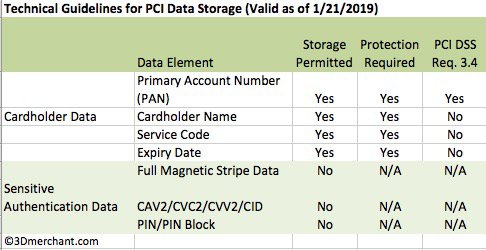
No, not if the goal is to defend against future disputes. Merchants can never store the security code on paper or electronically. It’s a violation of the both merchant card acceptance and PCI Compliance* rules. The penalties can be especially stiff, even reaching over one million dollars in fines and jail time, for merchants in industries covered by special identity theft rules. For example, automotive dealers and health care providers also collect sensitive personal data, increasing regulatory obligations for protecting consumers from identity theft.

First Data, a leading credit card processor, has this language in their PCI Rapid Comply 2013 questionairre:  “Do you make sure that you NEVER, EVER store the card-validation code or value (three-digit or four-digit number printed on the front or back of a payment card) used to verify card-not-present transactions after authorization (even if encrypted)?”

If it’s never OK, how can card not present merchants protect against fraud and disputes?

  1. Increase capabilities to accept card present transactions. For example, a local business might add mobile card readers for delivery personnel to swipe credit cards.
  2. Require remote buyers to print the sales receipt, sign and send back. A signed sales receipt containing the authorization code and correct authorization language enhances the trail of evidence.
  3. Same as above, except for commercial accounts, require the cardholder forward the email receipt with their electronic signature from a company email address.
  4. Require cardholders to specifically approve any 3rd party delivery address or personnel. Maintain all email communication records related to the sales process.
  5. Switch to self-serve payments such as an online pay page or electronic bill presentment and payment, both of which create opportunities for trails of electronic evidence. Use a third party provider to reduce PCI Compliance burden.
  6. Use a third party service to electronically store sensitive payment information in a ‘vault’ for recurring customers. Ensure that no one can access the full card or ACH information.
  7. Have a set of policies that can be remotely managed, monitored and enforced. This is critical in a multi location environment.

* PCI Compliance: short for Payment Card Industry Data Security Standards, or PCI DSS. All merchants are subject to PCI Compliance and the requirements vary by a number of factors including how payments are accepted and business size.

About the author: Christine specializes in providing innovative card not present payment processing solutions for manufacturers, wholesale distributors and new car dealers to improve PCI Compliance and streamline the payment experience for both merchants and customers. It’s fast, easy to use, and requires no capital investment to implement. For CenPOS sales call Christine at 954-942-0483 or click here for more information.

What is level 3 processing? What are merchant benefits?

Wednesday, April 10th, 2013

Level 3 credit card processing is explained, including merchant account and payment gateway requirements in this video of a slide presentation. What is it? What are the financial benefits? How can I get level 3 credit card processing for my business to business company?

Plus a brief mention of our technology that creates merchant efficiencies to qualify eligible purchasing, corporate, and business cards for level 3 qualified interchange rates.

To get level 3 processing for your merchant account or for more information about solutions to streamline payment acceptance for your business to business company with card not present customer transactions, contact us.

What’s the rate difference between Moto and Retail Sales Transaction fees?

Monday, April 8th, 2013

While individual merchant accounts may have different terms, the answer below is based on credit card processing interchange rates only.  Interchange is the primary component of credit card processing fees. It consists of a percent and a per item fee. Interchange rates are non-negotiable, but they can be influenced.

There is no difference in MOTO or Retail Interchange rates for:

  • Regulated debit (about 75% of debit cards on the market. )
  • Most or all business, corporate and purchasing cards*

For the rest, it’s a wide variety. 0. 30% estimated average difference in rate based on whether mag stripe is received or not.

Below are related explanatory notes. The question above was posed by a merchant that recently added CenPOS to improve PCI Compliance and reduce costs with their existing wholesale, interchange plus, merchant account.

  1. Level 3 data. Neither the gateway nor retail terminal supported level 3 before. With the new terminal ID we requested from your processor, combined with CenPOS, both MOTO and retail can qualify for level 3 interchange rates. A 0.65% drop is typical on MasterCard.
  2. The old way transactions were processed, virtually none were able to ‘qualify’ for the best retail or MOTO rate due to a variety of reasons. With CenPOS proprietary optimization technology, the reverse is true.
  3. In the virtual terminal, the only time the MOTO check box needs to be selected is if a signature capture device is connected to the computer. The MOTO button disengages the terminal from being prompted for a signature.
  4. Confirm level 3 entitlements were turned on properly with the processor.  Level 3 is currently turned on in CenPOS as optional. After running a test transaction ( use any business card), and proper settlement to bank, change from optional to REQUIRED in the administrator panel . Please see this video for more information http://www.youtube.com/watch?v=sfmgQ50X8TQ&list=UUGvmy_5CXVYL1oN5rq-T5_Q&index=2 (my channel is youtube.com/3dmerchant)

* I’m not aware of any business, corporate and purchasing card that requires mag stripe data, and I’d have to pour through tons of documents to find out if there is an exception. However, different information is required to achieve qualified rates for business cards.

MOTO refers to mail order, telephone or fax order. A retail merchant account essentially tells the processor that the merchant mostly has customers that make purchases in person, and the merchant will send magnetic stripe data with the transaction. If there is no mag stripe data, the transaction is non-qualified. For a  MOTO account, the merchant represents that most transactions are card not present. An ecommerce account is necessary if payments are mostly accepted online via a shopping cart.

Can someone explain the ACH transfers for my billing? Vantiv & CenPOS merchants

Monday, March 18th, 2013

The Vantiv billing is a bit different than we’ve experienced with other processors, but the end result is the same. Below is an example of the text that appears on a Bank Of America business checking account for a merchant using Vantiv merchant services and CenPOS SaaS payment technology, as offered by your blog author, Christine.  Merchants are billed once per month for all fees, via ACH.

ACH Fees on Bank Of America Statement:

  1. On 3/4/2013 we were charged  MTHLY UNBN MERCHANTSERVCS CCD           -$876.66  “123456″*
  2. On 3/6/2013 we were charged GEN CENPOS CCD -$—-  “123456″
  3. On 3/11/2013 we were charged BILLING MERCH SERVICES CCD  -$255.26 “123456″

Item 1: MTHLY UNBN MERCHANTSERVCS CCD. These are pure interchange fees. Interchange is always a percentage of the transaction plus a per item fee. Interchange comprises the bulk of credit card processing fees. They’re non-negotiable, but they can be influenced, which is a significant factor in merchants choosing CenPOS, an intelligent payment gateway that optimizes transactions for qualified interchange rates.  Interchange rates reflect the cost as determined by card card type and other factors.

Fifth Third Merchant Services changed their name to Vantiv, see prior article for more information. The mailed statement return address is Merchant Services, Cincinatti.

Item 2: GEN CENPOS CCD. Fees match the CenPOS agreement and monthly statement.

Item 3: BILLING MERCH SERVICES CCD. sThese are costs for credit card processing services, in other words, the supplier of your merchant account. This includes accessing networks etc. For this statement, they’re all are dead cost passed through from Vantiv, plus the stated Vantiv fees. The merchant discount, per the agreement, is our profit.

* Each dollar amount has an account number “123456 example” that follows. For security reasons, the account numbers have been omitted from this blog post.

All costs/net sales=effective rate
old effective rate= 4.25% Includes all interchange, merchant fees, etc.
new effective rate = 1.63% Includes all above and CenPOS.
Nice!  While fees vary every month, the effective rate is a good indicator of the health of your credit card processing solution.

1.6% is a below average effective rate for a 100% business to business company with customers using corporate, purchasing, and international cards over 87% of all dollar volume. Additionally, all transactions are card not present.

CenPOS works with your existing processor, and is most effective with merchant accounts set up on wholesale or ‘pass through interchange’ pricing. CenPOS is fast, easy, and requires no capital investment to implement. For CenPOS, or for information about a new merchant account, call Christine at 954-942-0483 or click here for more information.

 
Christine Speedy

How can technology help self storage industry for payment processing?

Wednesday, August 15th, 2012

There are many ways we can help business owners improve profitability via payment processing technology, for both checks and credit cards. Frequently the customer makes the first payment in the office, and then they may or may not pay in person again later. This presents multiple potential efficiency and profit problems.

PROFIT BUSTERS FOR CREDIT CARD PROCESSING

  • If you have a retail merchant account, all transactions key entered after the initial swipe will not ‘qualify’ for the lowest rates.
  • Not entering all the information needed for different types of cards and transaction types, cost up to 1.05% extra, even if you have wholesale interchange plus rates.
  • If the customer agrees to storing credit card information, is your method PCI Compliant?
  • How many steps does it take you to charge customers on future invoices?
  • If  you do not comply with card acceptance rules, you’ll lose customer disputes. For example, if you key enter or electronically submit a recurring sale, without the MOTO (mail order, telephone order) or ecommerce and without the ‘recurring sale’, you’ll have a tough time defending chargebacks.
  • Chasing customers for expired card data on recurring sales.
  • Mailing invoices.

PROFIT GAINERS FOR CREDIT CARD PROCESSING

  • Intelligent system automatically identifies transaction and sends it with all the proper warranties and representments so you always hit qualified rates on both types transactions.
  • The above also impacts losses from disputes.
  • Never store payment data on your servers.
  • Payment platform doesn’t let employees impact costs- using rules, employees cannot override requirements.
  • Automate processes, including expiring card notifications and retries after failed transactions due to insufficient funds .
  • Deliver electronic invoices to email or mobile device via text.
  • Automated pin debit conversion- when it’s most economical- reduces cost of debit, even in the current Durbin Amendment era.

Example savings detail:

No Visa and Mastercard dues and assessments on pin debit. This isn’t much for the one store location, but if you have a big volume, it’s tens of thousands annually.

Commercial card transactions as low as 1.8% for MasterCard vs 2.65% with level 3 data at the Point of Sale and with the virtual terminal. A .8% savings just by sending the additional information needed.


Commercial card rates for tax exempt businesses- interchange qualification

Tuesday, July 17th, 2012

Law firms and other professional services businesses often have tax exempt sales. Regarding credit card processing interchange rates, if Visa Level II is only applicable on transactions with sales tax,  does this mean Comm Card Elec transactions that are at 2.95% cannot qualify for Level II and lower rate?

Not exactly. Merchants, including law firms, can qualify for lower rates than 2.95% for corporate cards.  The merchant must have a qualified business code (MCC) as submitted on their merchant application. The transaction must also be supplied with the correct data to qualify the transaction, which may vary depending on different factors.

Below is related information from Visa. Visa does not publish the ‘qualification criteria’ for different rate types, leaving it up to merchants to figure it out, or to rely upon their credit card processing vendor to help them.

Visa International Operating Regulations April 2012:

Commercial Card – Non-Travel Service, Level II Interchange Reimbursement Fee – U.S. Region In the U.S. Region, the Commercial Level II (non-Travel Service Category) Interchange Reimbursement Fee is available for taxable Commercial Visa Product Transactions that are CPS-qualified and meet certain additional data requirements as specified in the U.S. Interchange Reimbursement Fee Rate Qualification Guide. Tax-exempt Commercial Visa Product Transactions and Commercial Visa Product Transactions using the CPS/Account Funding program are not eligible for the Commercial Level II (non-Travel Service Category) Interchange Reimbursement Fee.

Commercial Card Business-to-Business (B2B) Interchange Reimbursement Fee – U.S. Region
In the U.S. Region, Commercial Visa Product Transactions that do not meet the Level II Enhanced Data requirement will qualify for the Commercial Business-to-Business Interchange Reimbursement Fee. To qualify for this program, the Transaction must be CPS-qualified as specified in the U.S. Interchange Reimbursement Fee Rate Qualification Guide and be completed at a Merchant properly assigned a business-to-business Merchant Category Code as specified in the Visa Merchant Data Standards Manual.

EDITORS NOTE: Looking at the Visa chart above, can you tell which rates are ‘qualified’ or ‘non-qualified’? No. And that’s the difficulty merchants, CFO’s,CPA’s and controllers face every day. The qualified rate rules are also different for MasterCard corporate cards which will be addressed in a later article.

CenPOS is a universal payment processing platform that provides efficiencies for merchants and their customers, reduces PCI DSS compliance burden, and many other benefits, including,  CenPOS is an intelligent payment processing platform that replaces inefficient and outdated solutions. A key differentiator is the proprietary way CenPOS helps merchants qualify transactions automatically. Unlike other solutions, it doesn’t rely on employees to do the right thing at the time of transaction.

WHERE TO BUY

CenPOS is sold through direct agents and resellers. There is also a referral program. Click here to become a CenPOS agent, reseller, or referral partner.  Click here to become a customer or call the hotline at the top of this web page.